 ClawDeploy
Deploy a Telegram AI Bot in Under 60 Seconds
You can have an AI assistant running on Telegram before you finish your coffee. That is not marketing copy. It is a literal description of what happens when you deploy a Telegram AI bot through ClawDeploy.
ClawDeploy handles the servers, the webhooks, the scaling, and the connection to Telegram's Bot API. You bring a bot token, an LLM API key, and about 45 seconds of your time. The result is a fully operational AI assistant with persistent memory, custom skills, and browser control, live on Telegram and ready to work.
This guide walks you through every step. By the end, you will have a running bot that remembers conversations, executes custom logic, and does things most chatbots cannot even conceptualise.
What You Need Before You Start
The setup is minimal. Gather these four things and you are ready to go:
- A Telegram account. You probably have one already. If not, download the app and sign up in under a minute.
- A bot token from @BotFather. This is Telegram's official way to create bots. We walk through this in the next section.
- An LLM API key from Anthropic, OpenAI, or Google. This is the brain behind your bot. Pick whichever model provider you prefer.
- A ClawDeploy account. Free to sign up. This is where you connect everything and hit deploy.
No servers. No Docker. No YAML files. No SSH keys. If you can paste two strings into a form, you can deploy a bot.
Create Your Bot with BotFather
BotFather is Telegram's built-in tool for creating and managing bots. Every Telegram bot starts here.
Open Telegram and search for @BotFather. It is a verified bot with a blue checkmark, so you cannot miss it. Tap "Start" to begin the conversation.
Send the command /newbot. BotFather will ask you two things: a display name for your bot and a username.
The display name can be anything ("My AI Assistant", "Support Bot", your cat's name). The username must end in bot and be unique across all of Telegram, so something like mycompany_support_bot works well.
Once you confirm the username, BotFather replies with your bot token. It looks something like 7123456789:AAH1bGcIr_example_token_here. Copy this token and keep it somewhere safe. You will paste it into ClawDeploy in the next step.
Treat your bot token like a password. Anyone with this token can control your bot. If it ever leaks, use
/revokenewin BotFather to generate a fresh one.
That is the entire BotFather process. Two questions, one token, done.
Pick a Model and Deploy Your Telegram AI Bot
This is where ClawDeploy earns its name. Sign in to your ClawDeploy dashboard and start the deploy wizard. The whole process is three fields and a button.
First, enter your LLM API key. This tells ClawDeploy which model provider to use. You can swap models later without redeploying, so do not overthink the initial choice.
Second, paste your Telegram bot token. This is the token BotFather gave you in the previous step. ClawDeploy uses it to connect your bot to Telegram's servers and start receiving messages.
Third, pick your model. Each has a different personality:
- Claude (Anthropic): Best for deep, nuanced conversation. Excellent at following complex instructions and maintaining context over long threads. The "thinking deeply" choice.
- GPT (OpenAI): Fast responses with strong general knowledge. Great for customer-facing bots where speed matters more than philosophical depth.
- Gemini (Google): The cost-effective option with solid performance across most tasks. Good for high-volume bots where API spend is a concern.
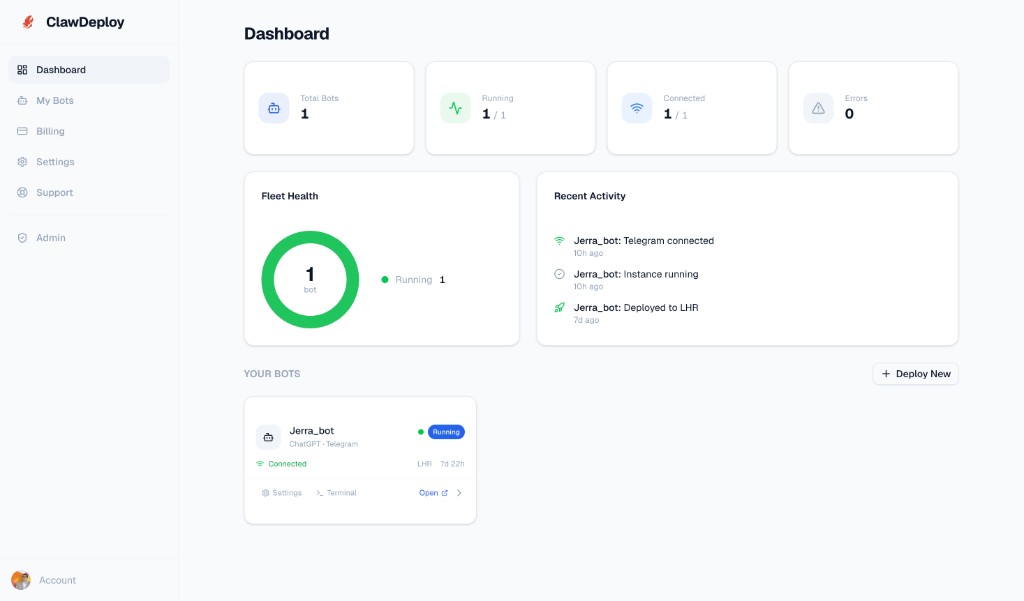
Hit Deploy. ClawDeploy provisions your bot's infrastructure, configures the Telegram webhook, and connects everything. The entire process takes under 60 seconds.
You will see your new bot appear on the dashboard with a green "Connected" status. No server provisioning. No reverse proxies. No webhook debugging.
Source: clawdeploy.net/dashboard
You went from "I have a bot token" to "I have a running AI assistant" in less time than it takes to argue about tabs versus spaces.
Verify the Connection and Send Your First Message
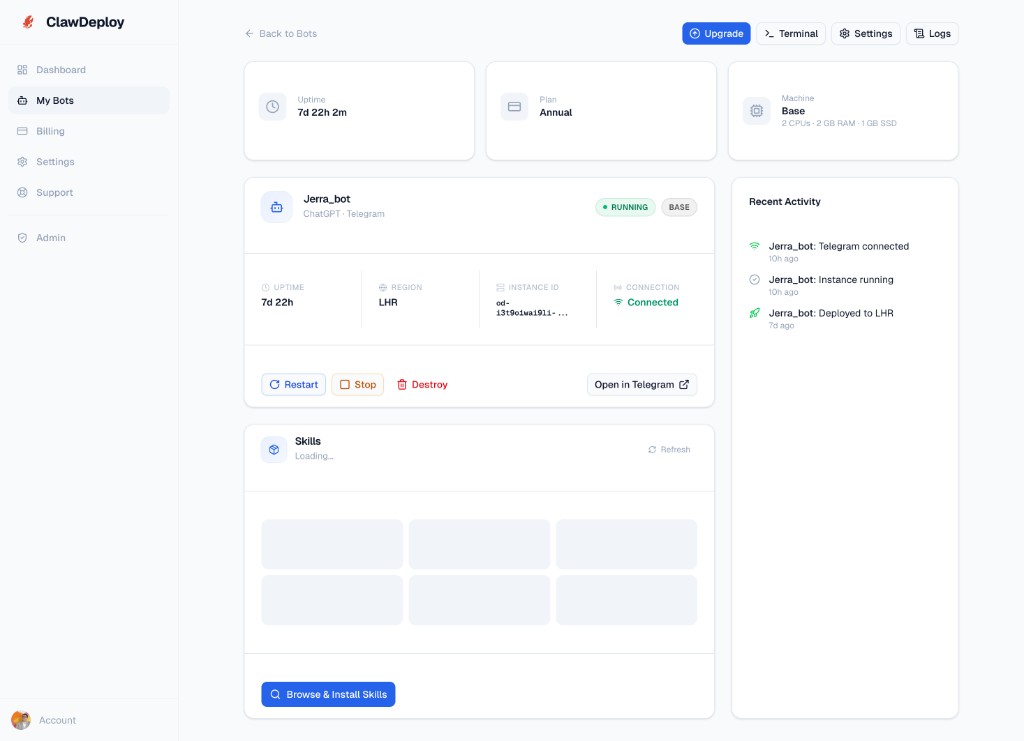
Head back to your ClawDeploy dashboard and click on your new bot. The detail page shows everything you need: uptime, region, connection status, installed skills, and recent activity. Look for the green "Connected" badge. If it is green, your bot is live.
Source: clawdeploy.net/dashboard/bots
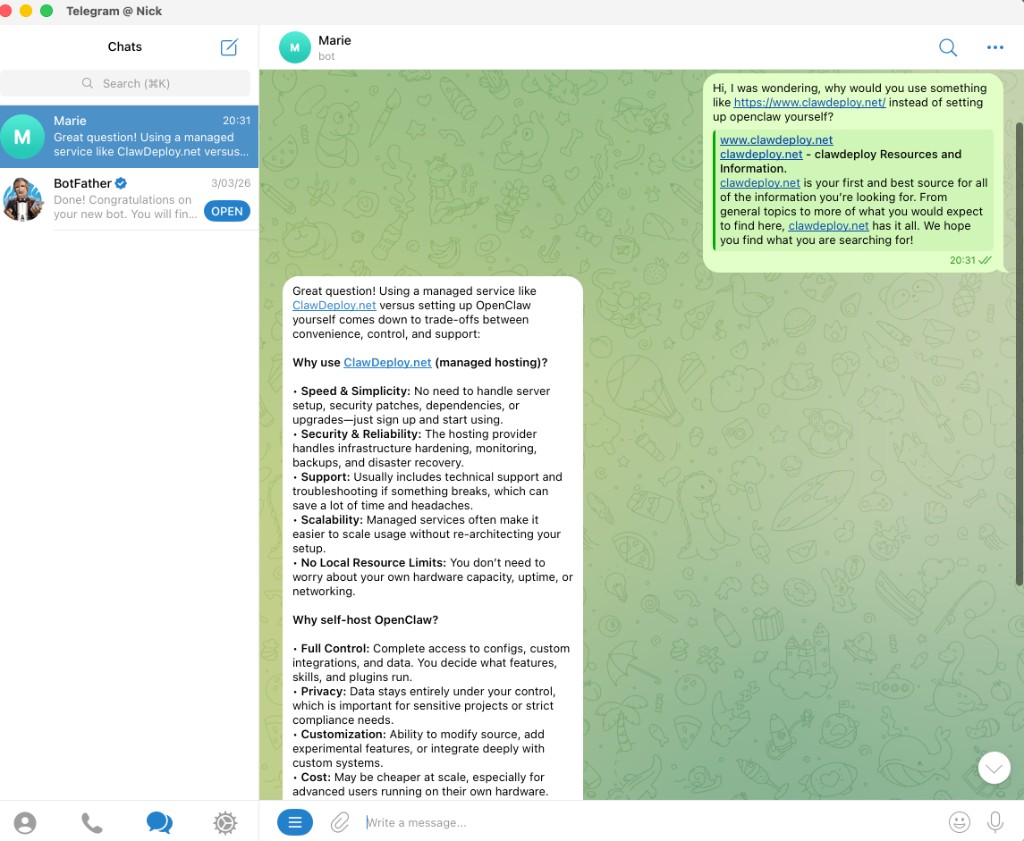
Now open Telegram and find your bot. Search for the username you chose during the BotFather step, tap "Start", and send a message. Something simple works: "Hello, what can you do?"
Your bot will respond with a real, contextual answer powered by the LLM you selected. This is not a canned greeting. It is a full AI conversation running on infrastructure you did not have to build, maintain, or think about.
Source: Telegram conversation with an OpenClaw assistant deployed via ClawDeploy
Try asking a follow-up question that references your first message. The bot will remember the context because OpenClaw, the open-source framework powering every ClawDeploy bot, includes persistent memory by default. Your bot does not treat each message as a blank slate. It builds understanding across the entire conversation history.
What Your Telegram AI Bot Can Do Out of the Box
A freshly deployed OpenClaw bot is already more capable than most custom chatbot implementations. Here is what you get without writing a single line of code.
Persistent memory is the headline feature. Your bot remembers every conversation with every user across every session. When someone returns days later and references something they mentioned last week, the bot recalls it instantly. This is what separates a genuine AI assistant from a glorified search box.
For a deep dive into what memory-powered bots can do for your business, check out 7 ways AI assistants replace manual work.
Skills extend your bot's capabilities beyond pure conversation. Skills are modular add-ons that give your bot the ability to call APIs, run custom logic, process files, and interact with external services. Think of them as plugins, but smarter: your bot decides when to use a skill based on the conversation context rather than relying on rigid trigger keywords.
Browser control is the feature that makes people's eyes go wide. Your OpenClaw bot can navigate websites, fill out forms, extract data from pages, take screenshots, and interact with JavaScript-heavy applications. Need your bot to check a competitor's pricing page every morning and report changes? It can do that. Need it to log into a dashboard and pull the latest metrics? Also covered.
The combination of these three capabilities means your Telegram bot is not just a chat interface. It is an autonomous agent that can reason, remember, and act on the web.
And because ClawDeploy handles all the infrastructure, you never have to worry about uptime, scaling, or server maintenance. Your bot runs 24/7 on managed infrastructure while you focus on what it should do rather than how to keep it running.
Next Steps: Adding Skills and Customising Your Bot
Your bot is live. Now make it yours.
The OpenClaw skills marketplace is where things get interesting. Browse pre-built skills for web search, file access, calendar integration, CRM lookups, and dozens of other capabilities. Installing a skill takes one click from the ClawDeploy dashboard. No code, no config files, no redeployment.
Want to go further? Build custom skills tailored to your specific workflows. OpenClaw's skills API is straightforward: define what the skill does, what inputs it expects, and what it returns. Your bot learns when to invoke the skill automatically based on conversation context.
ClawDeploy's pricing includes everything: hosting, scaling, Telegram integration, persistent memory, and access to the skills marketplace. There are no per-feature charges or surprise add-ons. Pick a plan and your bot gets the full platform.
For inspiration on what to build, revisit the automation use cases we covered in our business automation deep dive. Customer support, sales qualification, content creation, market monitoring, internal knowledge bases, and daily briefings are all deployable with the bot you just created. The only difference between "basic chatbot" and "business automation engine" is which skills you install.
Your Telegram AI bot is live. It remembers conversations, runs custom skills, and handles work you used to do manually. Go build something with it.
Deploy Your AI Assistant
Pick a model, choose a channel, deploy. Go from zero to a running AI assistant on Telegram, Discord, or WhatsApp in under a minute.